Planforge
  • Software
  • Solutions
  • Pricing
  • Why Planforge
  • Resources
  • en
  • de
 
  • en
  • de
  • Software
  • Solutions
  • Pricing
  • Why Planforge
  • Resources
Back

Capabilities

  • Project Management Manage projects from start to closure
  • Program Management Plan and control several related projects
  • Portfolio Management Align projects with strategic objectives
  • Idea Management Capture ideas for continuous innovation
  • Resource Management Plan capacities and allocate resources
  • Enterprise Agile Planning Manage OKRs, epics, and Agile Release Trains

Software Overview

Back

Solutions

  • Project Management Office All tools for your PMO
  • Lean Project Management Making daily project work easier
  • New Product Development Faster Time-To-Market

All Solutions

Integrations

Jira Confluence SAP Teams
All Integrations

Back
Back

Why Planforge

  • What our customers say
  • Success Stories

Book a demo

  • Compare Planforge
  • See Planforge in Action
Back

About us

  • About Planforge
  • Press & Media
  • News from Planforge

Become a partner

Resources

Getting Started Guide Help Center FAQ

Planforge Newsletter

Planforge Option

Gate Management

Calculate gate maturity automatically from project progress. Manage go/no-go decisions in one place.

Start for free

✓ Free for up to 4 users ✓ Gate management included ✓ GDPR-compliant

Your browser does not support the video tag.

Why Preparing for a Gate Review Takes So Much Effort

Process gates are often maintained separately from the project plan. That means extra updates and time-consuming review preparation.

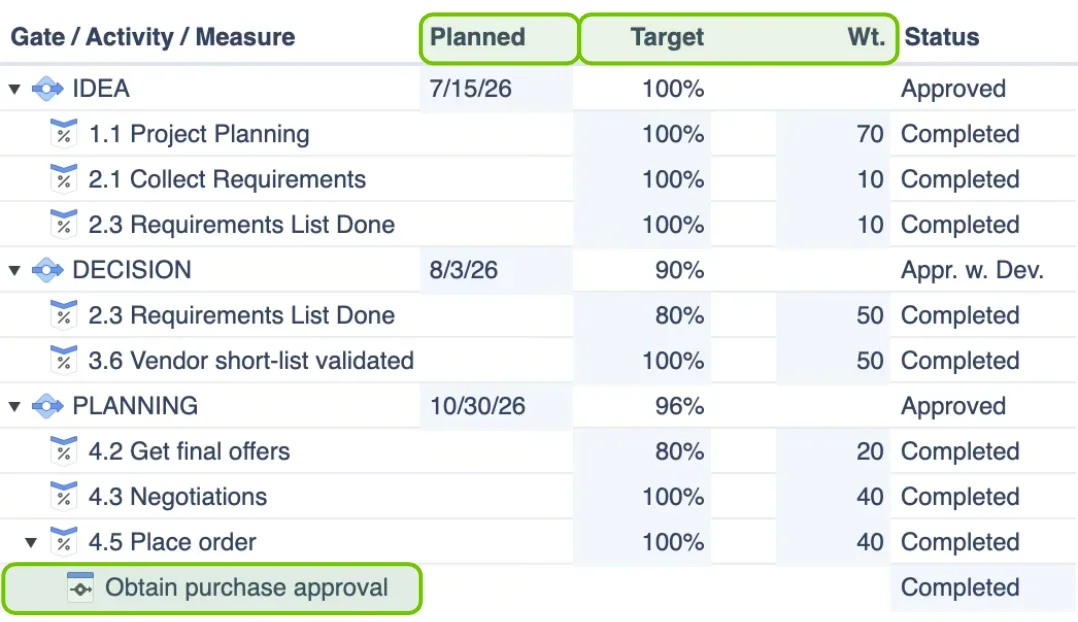
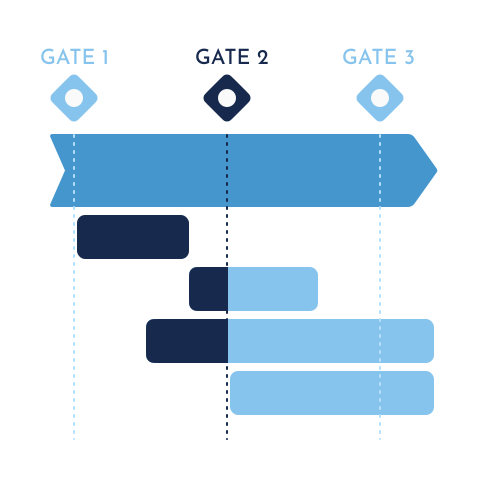
Planforge links gate criteria directly to activities (work packages and milestones). The maturity rating is calculated automatically from project progress, weighted by your criteria—with no duplicate data entry. Gate decisions stay fully documented and traceable.

gate-management-chart.planforge

Organizations already planning with Planforge

  • EVVA
  • Hoffmann-La Roche
  • Zürich Versicherung AG
  • Technische Universität Wien
  • Rohde & Schwarz
  • Caritas
  • GEZE
  • Pensionsversicherung Österreich
  • Tiger Coatings
  • indie Semiconductor
  • hobex
  • Regatron
  • Astotec Automotive GmbH
  • Stadt Wien – Wiener Wohnen Kundenservice
  • Barmherzige Brüder

How Gate Management Works in Planforge


From Project Plan to Maturity Rating

Define your process gates once, centrally, in the project pipeline, and reuse them in project templates and plans.

  • Set your own criteria: Each gate consists of criteria that you link to activities. You define the target value and weight for each criterion.
  • Maturity rating updates automatically: It's derived from the progress of the linked activities, weighted by your settings.
  • Target dates at a glance: Each gate's target date is monitored based on the actual and planned finish dates of its linked activities.
  • Measures as to-dos: Assign measures to criteria, and they're created directly as to-dos.

planungsansicht-gate

From Maturity Rating to Approval

Every gate review ends in a decision: approve, approve with deviations, or reject. The calculated maturity rating is the foundation for that decision.

  • Compare progress: See the maturity rating and traffic light of the current attempt next to the previous one.
  • Keep the full history in view: Document all review attempts and decisions in one place and trace them at any time.
  • Share reviews: Export individual reviews or the gate progress report, with status and complete history, as a PDF.

From Approval to Reporting

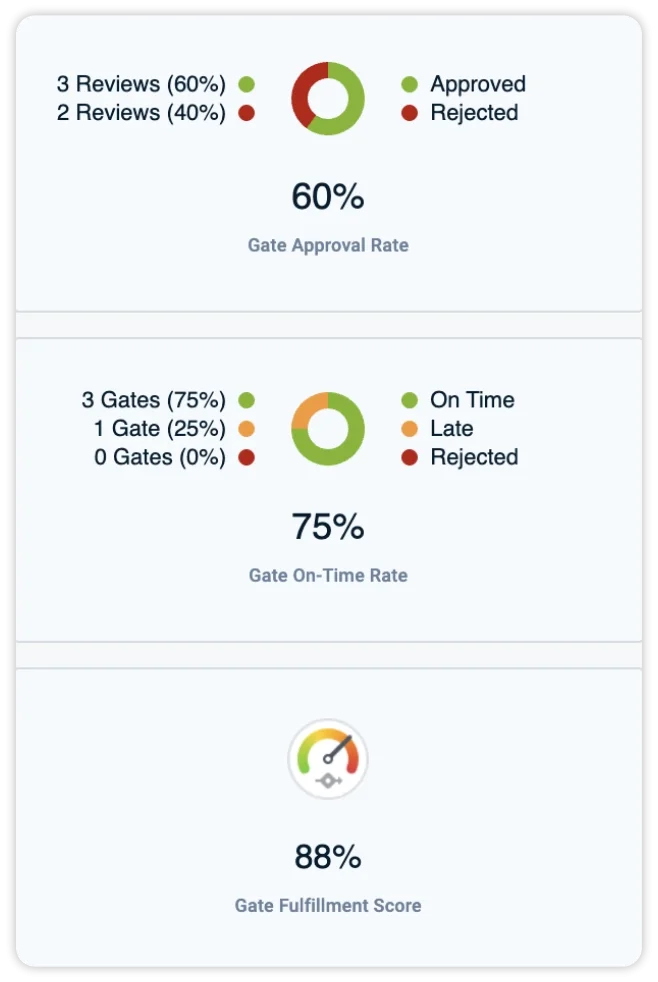
Your gate reviews generate metrics for the entire portfolio.

  • Approval rate: Share of reviews that were approved
  • On-time rate: Share of gates reached on schedule
  • Fulfillment score: How completely the gate criteria are met

Available with the Portfolio Analysis Option.

gate-kpis-de

See Gate Management in Action

Book a demo

✓ Free ✓ No obligation ✓ Tailored to your questions

Gate Management Is Just the Beginning

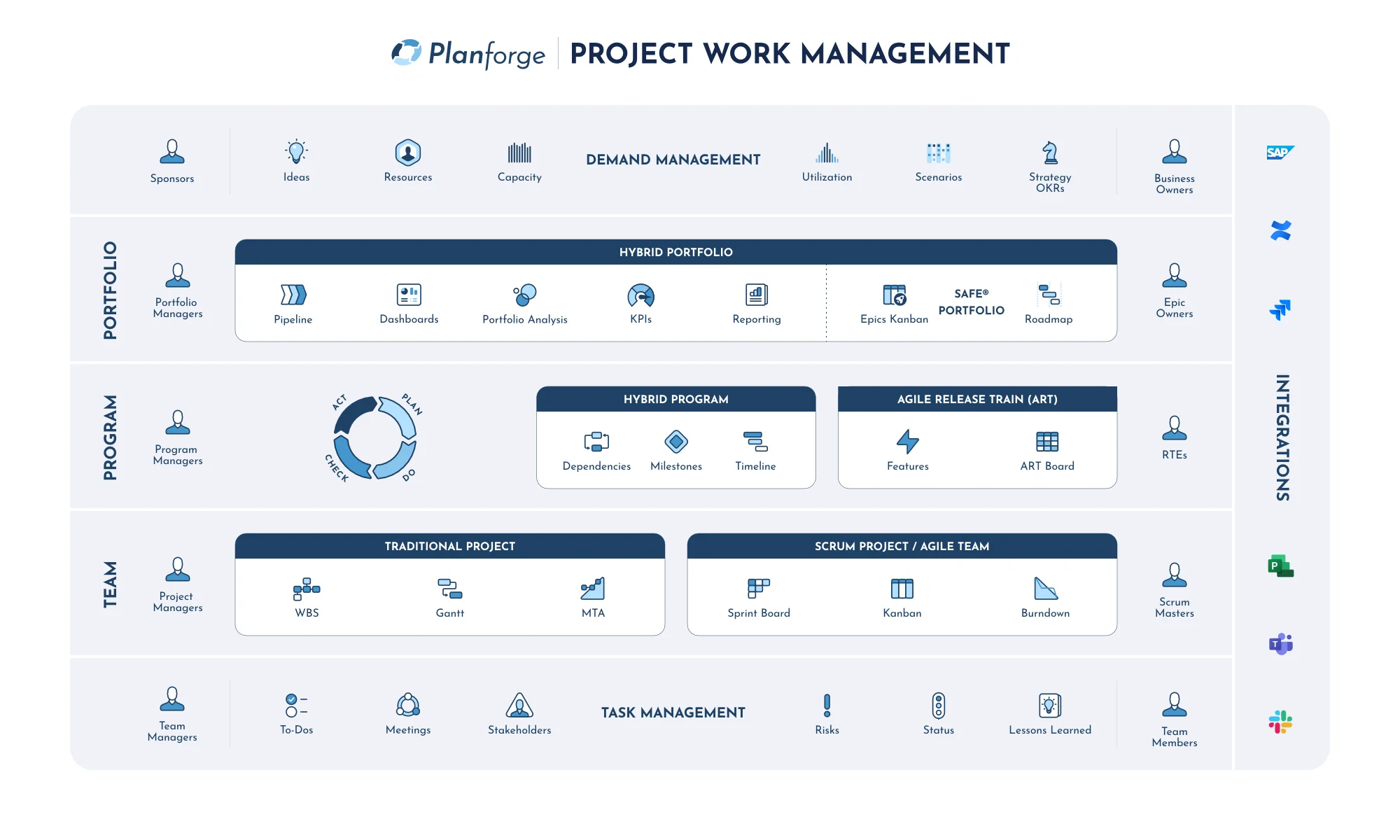
The same project plans that drive your gate maturity ratings also feed resource utilization and the portfolio overview, with no duplicate data entry.

Instead of separate information silos, projects, resources, and portfolios work together in Planforge. The overview shows everything that's behind it.

Explore all features

Planforge-Chart-EN

SourceForge Top Performer

Capterra 4,5 von 5 Sternen auf Capterra

GetApp 4,5 von 5 Sternen auf GetApp

G2 High Performer Spring 2023

Try Gate Management for Yourself

✓ Free for up to 4 users ✓ Gate management included ✓ GDPR-compliant

Frequently Asked Questions

The Gate Management Option is an extension of the Planforge Project Work Management software. It links gate criteria to activities (work packages and milestones), calculates the gate maturity rating automatically from project progress, and documents every approval decision: approved, approved with deviations, or rejected.

With a separate checklist, every change in the project plan has to be carried over by hand. In Planforge, gate criteria are linked directly to existing work packages or milestones. Progress changes flow automatically into the weighted maturity rating, with no duplicate data entry. The formal approval still takes place in the gate review.

In Planforge, the gate maturity rating is calculated automatically from the progress of the linked work packages or milestones, weighted by the settings you define for each criterion.

Example with demo data: A gate has three criteria weighted 20%, 40%, and 40%, and a target maturity rating of 96% (derived from the criteria's target values). The first two criteria are complete; the third (40%) is 25% done. The maturity rating is 70% (20 + 40 + 0.25 × 40), and the traffic light is red. Once the third criterion is complete, the rating rises to 100%. The formal approval still takes place in the gate review.

The Gate Management Option is included in the Enterprise plan and can be added to the Lean and Professional plans. Up to four users can use it in the free version. For an overview of all plans, see Pricing.

Yes. Planforge's free version is free forever, with no trial period and no expiration date. Up to four users can use and try out Gate Management. Enable the option under Settings > Options. Integrations such as Jira or SAP are not included in the free version.

Want to roll out Gate Management across your project organization?
In a live demo, we'll show you how to map your gate processes in Planforge.

Planforge
Software
  • Work Management
  • Project Management
  • Gate Management: Automatic Maturity Rating
  • Resource Management
  • Program Management
  • Portfolio Management
  • Strategic Management
  • Idea Management
  • Enterprise Agile Planning
Solutions
  • Project Management Office
  • Lean Project Management
  • New Product Development
Integrations
  • API
  • Jira
  • Confluence
  • SAP
  • Teams
Why Planforge
  • References
  • Success Stories
  • Comparison of PPM Solutions
About Planforge
  • Company
  • Partners
  • Jobs
  • News
  • Press
Planforge GmbH

Dietrich-Keller-Strasse 24/6
8074 Raaba-Grambach (Graz), Austria
+43 (316) 267 267 0

Planforge Germany

Mühlenstrasse 13
85778 Haimhausen (Munich), Germany

© 2026 Planforge GmbH   info@planforge.io   Imprint   Privacy

li fb o yt tw