Planforge Blog
  • Software
  • Solutions
  • Pricing
  • Why Planforge
  • Resources
  • en
  • de
 
  • en
  • de
  • Software
  • Solutions
  • Pricing
  • Why Planforge
  • Resources
Back

Capabilities

  • Project Management Manage projects from start to closure
  • Program Management Plan and control several related projects
  • Portfolio Management Align projects with strategic objectives
  • Idea Management Capture ideas for continuous innovation
  • Resource Management Plan capacities and allocate resources
  • Enterprise Agile Planning Manage OKRs, epics, and Agile Release Trains

Software Overview

Back

Solutions

  • Project Management Office All tools for your PMO
  • Lean Project Management Making daily project work easier
  • New Product Development Faster Time-To-Market

All Solutions

Integrations

Jira Confluence SAP Teams

All Integrations

Back
Back

Why Planforge

  • Customers
  • Success Stories

Book a demo

  • Compare Planforge
  • See Planforge in Action
Back

About us

  • About Planforge
  • Press & Media
  • News from Planforge

Become a partner

Resources

Getting Started Guide Help Center FAQ

Planforge Newsletter

September 12, 2026

Kanban Board

What is a Kanban Board?

In project management, the Kanban board visualizes workflows. It limits work in progress and maximizes flow. Using Kanban boards makes work visible for teams and helps them stay on track. The Kanban board displays columns and cards with visual signals.

Originally developed to support the production process, the Kanban board often has three columns: "Open," "In progress," and "Completed." Work elements are usually represented as rectangles (physically, e.g., with sticky notes) and are located in the corresponding areas depending on their status. If the status of the work element has changed, it is moved to the appropriate area.

Benefits of the Kanban Board

  • Increases productivity
  • Improves collaborative work
  • Increases transparency
  • Improves focus

Kanban vs. Scrum

Kanban and Scrum are both agile frameworks, but there are some differences:

  • Scrum team members have predefined roles. Kanban teams don't.
  • Kanban is an ongoing process, while Scrum sprints provide start and end dates.
  • During a sprint in Scrum, changes are discouraged, while Kanban allows for changes.

Kanban Board Example

The following figure visualizes a Kanban board in project management software:
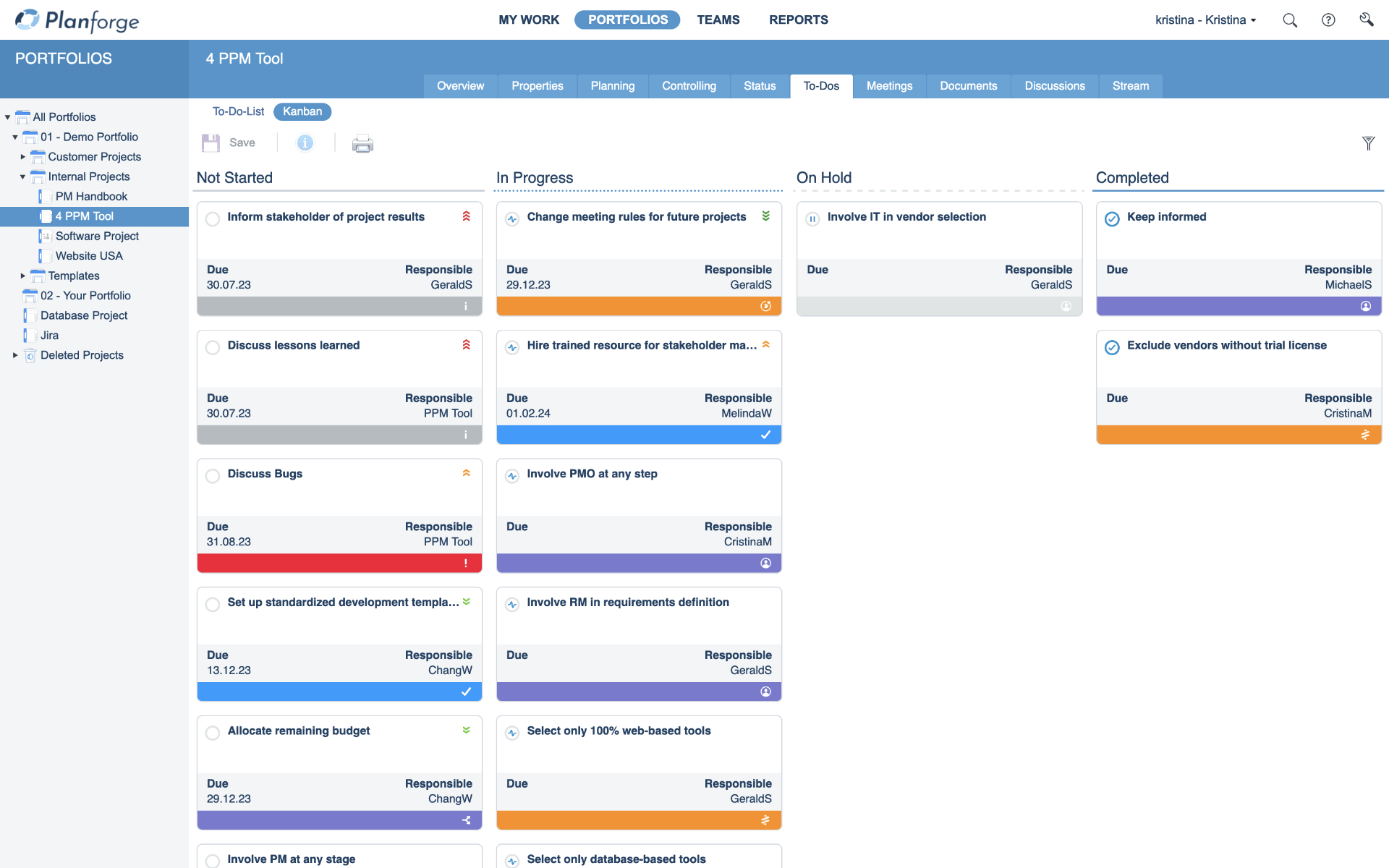
Kanban Board in project management software by Planforge

Gerald Aquila

Gerald Aquila

201 words • 2 minutes

Share on: Auf LinkedIn teilen Tweet Auf Facebook teilen

Related Articles

Part 3: Agile Methods at a Glance: The Kanban Method

The term Kanban comes from Japanese and consists of the words "Kan" for visualization and "Ban" for card, document or board. The best-known Kanban element is probably the Kanban board.

Read more

Read more

Planforge Blog
Software
  • Work Management
  • Project Management
  • Gate Management
  • Resource Management
  • Program Management
  • Portfolio Management
  • Strategic Management
  • Idea Management
  • Enterprise Agile Planning
Solutions
  • Project Management Office
  • Lean Project Management
  • New Product Development
Integrations
  • API
  • Jira
  • Confluence
  • SAP
  • Teams
Why Planforge
  • References
  • Success Stories
  • Comparison of PPM Solutions
About Planforge
  • Company
  • Partners
  • Jobs
  • News
  • Press
Planforge GmbH

Dietrich-Keller-Strasse 24/6
8074 Raaba-Grambach (Graz), Austria
+43 (316) 267 267 0

Planforge Germany

Mühlenstrasse 13
85778 Haimhausen (Munich), Germany

© 2026 Planforge GmbH   info@planforge.io   Imprint   Privacy

li fb o yt tw